Two businesses. Same industry. Same size. One gets quoted $3,000 for AI automation. The other gets quoted $28,000.
Both quotes are for "automating customer follow-up."
This is common because “AI automation” describes a range of work so wide that the phrase is nearly useless as a pricing signal. One business wants automated email sequences triggered by a form submission. The other wants a workflow that reads incoming emails, extracts intent, updates a CRM, routes to the right team member, and sends a context aware reply across three systems that were never designed to work together.
Same description. Completely different job.
If you are trying to budget for AI automation, the question is not "how much does it cost." The question is: what specifically are you automating, and what does that job actually involve?
This article answers that.
Quick answer
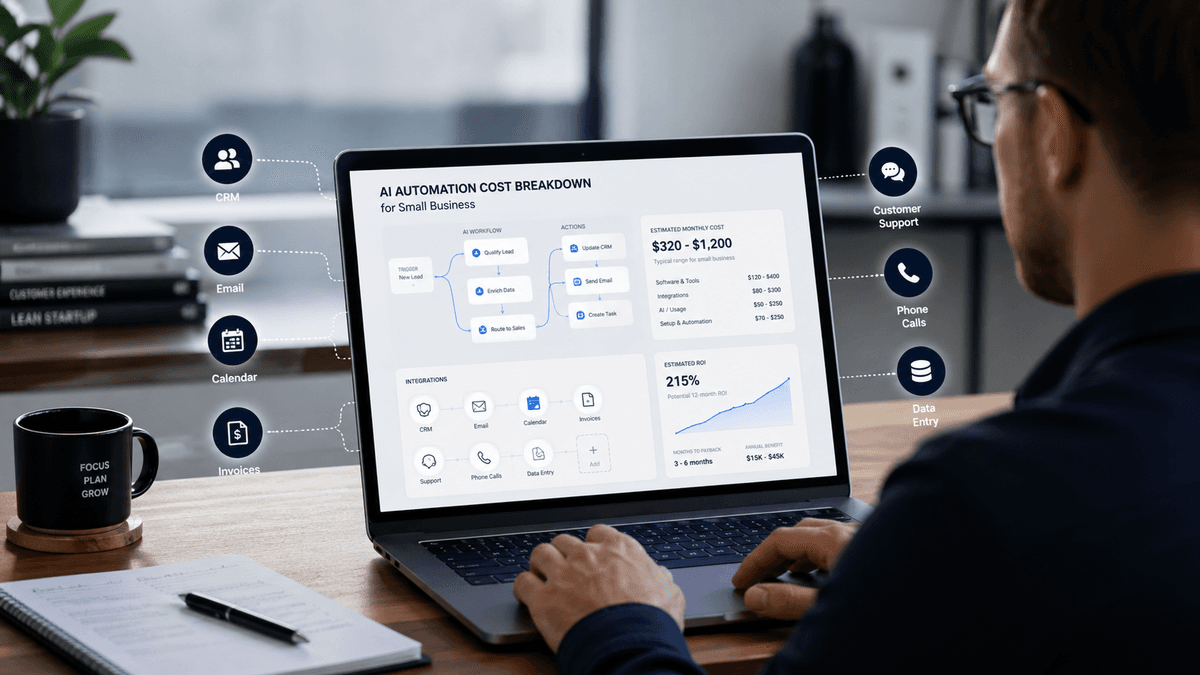
AI automation for a small business can range from under $100 per month for simple, off-the-shelf configurations to $30,000 or more for a custom, multi-system workflow built by a provider. As a rough guide, most projects fall somewhere between $1,500 and $10,000 to set up, with $200 to $1,000 per month in ongoing running costs. These are estimates, not benchmarks, the actual number depends almost entirely on the factors below.
The five things that actually drive cost
1. How many systems need to connect
Every system your automation needs to talk to adds cost. A workflow that lives entirely inside one tool such as an AI chatbot built on your existing website platform, for example, is straightforward to set up. A workflow that needs to pull data from your CRM, push results to your project management tool, trigger an email in your email platform, and log an update in your accounting software is a different job entirely.
Each connection is a potential point of failure. Each system has its own API behaviour, update schedule, and quirks. Providers spend real time building and testing these connections, and that time appears in your quote.
As a rough guide, each additional system typically adds somewhere in the range of $500 to $2,000 to a setup cost, depending on how well-documented that system's integrations are. Treat this as an order-of-magnitude estimate, not a precise formula.
2. Custom build vs off-the-shelf configuration
Most automation tools like Make, Zapier, n8n, and the AI platforms built on top of them, have pre-built templates and connectors. If your workflow fits a template, setup is fast and cheap. A provider might configure it in a day or two.
If your workflow does not fit a template, someone has to build it. Custom prompts need writing and testing. Logic trees need mapping. Error handling needs designing. What looked like a two-day job becomes a two-week job.
A practical check: if you can find a tutorial covering your exact use case in under 20 minutes, you are probably in template territory. If your use case involves more than one exception or an unusual trigger condition, you are probably not.
3. How many edge cases the workflow needs to handle
AI automation works well when inputs are predictable. It requires more work when inputs vary.
A workflow handling standard enquiry emails is straightforward. A workflow handling standard enquiry emails, plus complaints, plus emails in languages other than English, plus messages from existing customers who need account lookups, plus emails containing attachments, that is a different scope.
Providers quote for edge cases because edge cases are where automation breaks. Every time a workflow encounters something it was not built for, it either fails silently, produces wrong output, or requires a human to step in. Good providers design for this upfront. That design work is in the price.
Before accepting a quote, ask: what happens when the workflow gets an input it is not expecting? If there is no clear answer, the edge cases were not priced for.
4. Quality of your existing data
This is the cost driver most businesses do not see coming.
AI automation runs on structured, consistent data. If your CRM has duplicate contacts, inconsistent field formatting, missing information, or years of entries made by different people using different conventions, the automation will not work reliably until that is fixed.
Data cleaning is not what anyone wants to pay for. But skipping it means the automation you just paid for produces unreliable outputs from day one.
Most providers do not include data cleaning in an initial quote unless you ask directly. Add it to the list of things to confirm before you sign.
5. Ongoing management requirements
Some automations are genuinely set-and-forget. A simple lead notification that fires when a form is submitted does not need weekly attention.
Most AI automations are not like that.
AI models get updated. Connected tools change their APIs. Business processes shift. Prompts that worked well six months ago can start producing different outputs. Someone needs to monitor this, catch the drift, and adjust.
If a provider quotes you a setup cost with no mention of ongoing management, ask what happens when the underlying model changes behaviour. If the answer is "you handle that," factor in your own time. If the answer is "we include that in our retainer," check what the retainer covers and what it costs.
Price ranges by workflow type
These are AUD estimates based on typical small business projects, covering both setup cost (one-time) and monthly running cost (tool licences plus any provider management fee). Treat them as planning guides, not fixed prices.
A simple chatbot handling FAQs on a single platform sits at the low end: setup costs range from nothing (DIY configuration) to around $2,000, with monthly running costs of $50 to $200. Complexity is low.
Lead follow-up automation (a form submission triggering an email sequence) typically costs $500 to $3,000 to set up and $100 to $400 per month to run. Low to medium complexity.
An AI phone answering or receptionist workflow sits in the middle range: $1,500 to $5,000 to set up, $200 to $700 per month ongoing. Medium complexity.
Customer support triage (classifying and routing incoming emails) runs $2,000 to $8,000 to set up and $300 to $900 per month. Medium complexity.
Data entry automation moving information from documents into a CRM typically costs $3,000 to $10,000 to set up and $300 to $800 per month. Medium to high complexity depending on document variability.
At the high end: a multi-system workflow with three or more integrations and custom logic. Setup costs start at $8,000 and can exceed $30,000. Monthly running costs typically fall between $500 and $2,000. These are the projects where integration complexity and edge case handling drive the price.
All figures assume a provider is doing the work. If you are configuring tools yourself, remove the setup cost and substitute your own time.
The DIY route is viable for simple, well-defined workflows. Here is what a real 12-month comparison looks like.
DIY path:
Tool licences: roughly $100–$500 per month
Your setup time: 10–40 hours
Your ongoing management: 2–5 hours per month
Total year-one cost depends heavily on how you value your time
Provider path:
Setup cost: $2,000–$10,000 (for most small business projects)
Monthly management retainer if included: $500–$1,500
Your time involvement: minimal once live
The DIY path is cheaper when the workflow is simple, someone on your team has the capability to build and maintain it, and the cost of getting it wrong is low. The provider path makes sense when the workflow is complex, integrations require custom work, or failure has a real cost like a broken customer-facing process, a missed compliance requirement, or a workflow that produces bad outputs for weeks before anyone notices.
The wrong frame for this decision is "what can I afford." The right frame is "what does getting it wrong cost."
The costs that appear after you sign
Even well-scoped projects carry costs that rarely appear in initial quotes.
Integration updates. When a connected platform changes its API (which they do, sometimes without warning), your workflow can break. Fixing this is rarely included in a fixed-price setup quote. Confirm before you commit whether your provider covers this as part of an ongoing retainer.
Model behaviour changes. AI platforms update their underlying models. An update that improves performance on one task can affect performance on another. If your workflow relies on consistent model output, someone needs to monitor and adjust when updates ship.
Platform costs at higher usage tiers. Automation platforms typically offer low entry costs that increase as usage grows or as your workflows move into higher processing tiers. What costs $100 per month at low volume may cost considerably more at scale. Build headroom into your monthly estimate, and check the pricing tiers for any tool before committing to a workflow that will grow.
Staff time for exceptions. Every automation has a fallback for edge cases the system could not handle. Someone on your team will process those. If the automation handles 200 interactions per month and 5% fall through, that is 10 interactions per month your team absorbs that they were not handling before.
Find AI Now verdict
Two scenarios push costs past what businesses expect.
The first is underestimated integration complexity. A business says they want to connect their CRM to their AI tool. Sounds straightforward. Then it turns out the CRM is an older version with a poorly documented API, the AI tool requires a paid connector, and the CRM fields do not match the data structure the AI needs. A $3,000 project becomes a $9,000 project. Ask any provider you are quoting with to walk you through the integration plan specifically, not just "yes we can connect those," but how, and at what cost.
The second is automating a messy process. Businesses that try to automate before their process is documented usually pay more and get worse results. The automation mirrors the process it is built on. If the process is inconsistent, the automation will be too. Cleaning up the process first is not a delay. It is what makes the automation worth building.
How Find AI Now helps
Most businesses approach AI automation without a clear number in mind. They get a quote, have nothing to compare it against, and either overpay or walk away from something that would have been worth doing.
Find AI Now gives you two things before you commit. The ROI calculator lets you estimate what a specific workflow is worth automating based on your actual numbers. The provider matching flow helps you find or request suitable AI automation providers, with the information you need to compare scope, pricing model and track record before you make contact.
Before you accept a quote, run the numbers.
FAQ
Why do AI automation quotes vary so much between providers? Because "AI automation" covers a huge range of work. A quote at $2,000 is likely for a simple, templated workflow with minimal integration. A quote at $20,000 is likely for a custom build across multiple systems with edge case handling and ongoing management included. Before comparing quotes, confirm both providers are scoping the same work.
What is a reasonable price for a simple AI automation project? For a straightforward workflow with one system, a clear trigger, a predictable output, no custom integrations: setup costs in the range of $1,000 to $3,000 from a provider are typical. Monthly running costs of $100 to $400 in tool licences are common at that level. If a provider quotes significantly above this for simple work, ask for a detailed scope breakdown.
Can I automate without paying an agency? Yes, for simple workflows. Tools like Make, Zapier, and n8n have free tiers and template libraries. If you can define exactly what triggers the automation and exactly what it should do, a non-technical person can configure basic workflows without a provider. The DIY path becomes unreliable when workflows involve multiple systems, custom logic, or edge cases that need careful handling.
What ongoing costs should I budget for after setup? Budget for tool licences, any provider management retainer if your arrangement includes one, and your own staff time for exception handling. A rough planning figure: ongoing costs often run at 20 to 40 percent of the original setup cost per year, but this varies significantly depending on workflow complexity and how actively managed the setup is.
How do I know if a quote is fair? Ask the provider to break the quote into components: discovery and scoping, integration build, testing and QA, and any ongoing management. A fair quote has line items. A vague lump sum is harder to evaluate. Also ask what is not included, specifically whether integration updates, model behaviour changes, and data cleaning are covered or treated as extras.